
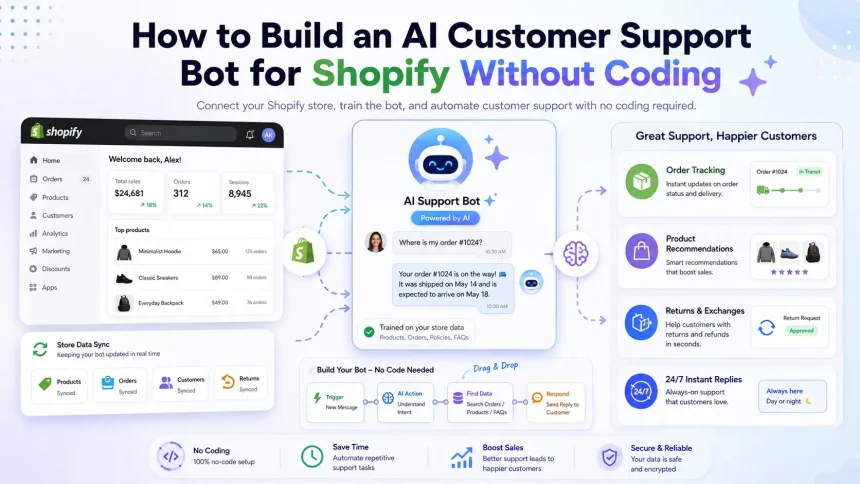
You can build an AI customer support bot for your Shopify store without writing a single line of code. All you need is a no-code platform like Tidio, Gorgias, or Freshdesk, a free account, and about 30 minutes. These tools connect directly to Shopify, pull your product and order data automatically, and answer customer questions around the clock.
This guide walks you through everything: the best no-code tools, a step-by-step setup process, and how to train your bot so it actually helps shoppers. By the end, you’ll have a working support assistant that answers common questions, tracks orders, and recovers abandoned carts—no developer required.
Table of Contents: What Is an AI Customer Support Bot for Shopify? · Why Add an AI Support Bot to Your Store? · Best No-Code AI Bot Tools for Shopify · Step-by-Step Setup Guide · How to Train Your Bot for Better Answers · How to Integrate the Bot Across Channels · Common Mistakes to Avoid · How Much Does a No-Code Shopify Bot Cost? · Final Thoughts
What Is an AI Customer Support Bot for Shopify?
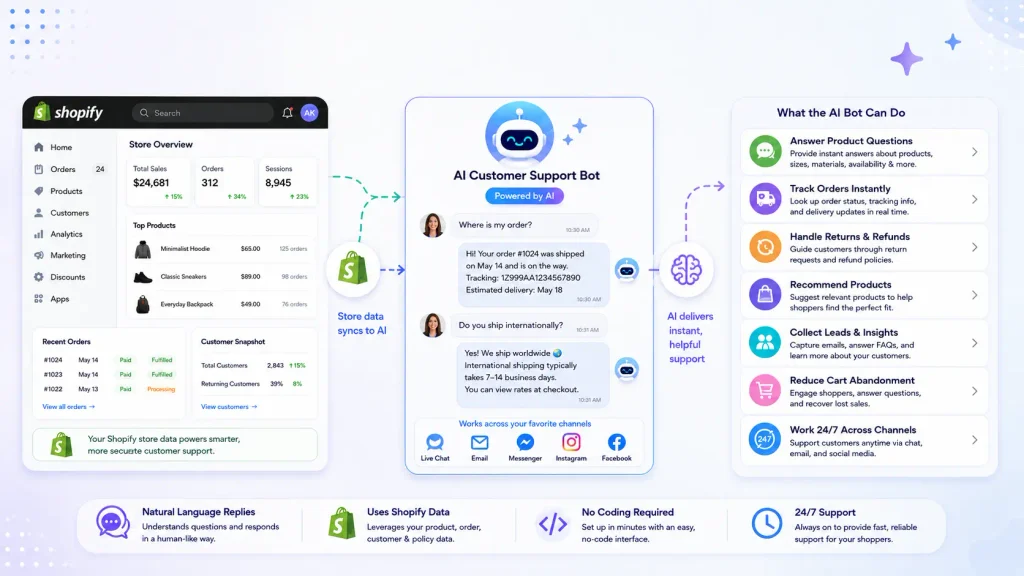
An AI customer support bot is software that chats with your customers automatically. It uses natural language processing to understand questions and reply in plain English (or any language you choose). Unlike a basic rule-based chatbot that only follows scripts, an AI bot learns from your store data and gives smarter, more human-like answers.
For a Shopify store, this bot can:
- Answer product questions instantly
- Track and update order status
- Handle returns and refund requests
- Recommend products based on what a shopper views
- Collect leads and reduce cart abandonment
- Work 24/7 across chat, email, and social channels
The best part? Modern platforms let you set all this up with drag-and-drop tools and pre-built templates.
Why Add an AI Support Bot to Your Store?
Shoppers expect fast answers. When someone can’t find shipping info or return details quickly, they leave. An AI bot fixes that gap.
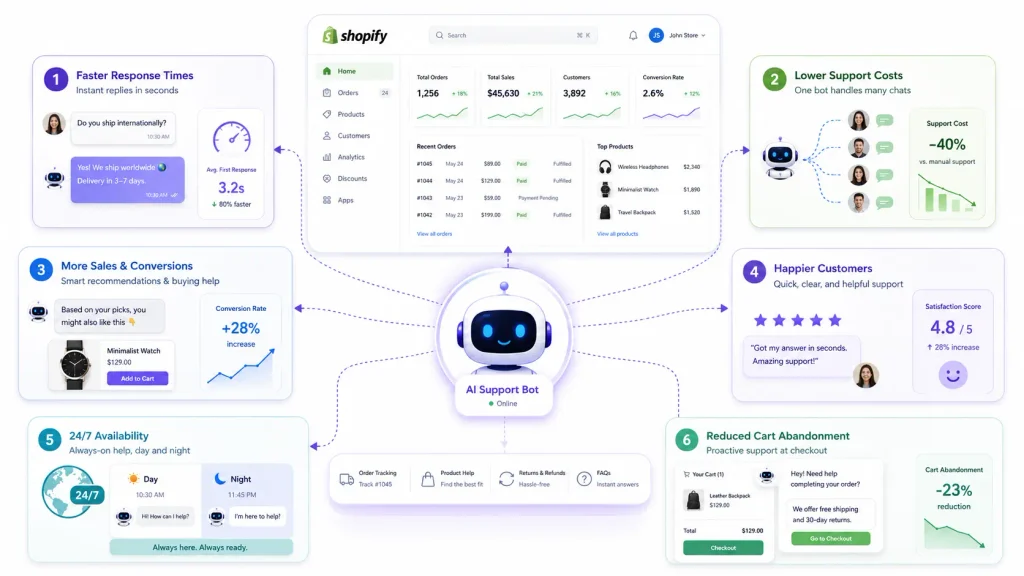
Here’s what a good bot delivers:
- Faster response times. Customers get replies in seconds, not hours.
- Lower support costs. One bot handles hundreds of chats at once, so you spend less on staff.
- More sales. Bots that suggest products and answer buying questions boost conversions.
- Happier customers. Round-the-clock help means no one waits until morning.
For small and mid-sized stores, a no-code bot is often the most affordable way to compete with big brands that run full support teams.
Best No-Code AI Bot Tools for Shopify
Before you build, pick the right platform. Here are the top no-code options, each with a Shopify app or direct integration.
Tidio
Tidio is one of the most popular choices for small stores. Its AI feature, Lyro, answers common questions using your store data. Setup is quick, and the free plan lets you test the waters. Tidio also combines live chat, email, and Messenger in one dashboard.
Best for: Beginners and budget-conscious store owners.
Gorgias
Gorgias is built specifically for e-commerce. It pulls order data, tracking numbers, and customer history straight from Shopify. Its AI agent can resolve tickets on its own and even process refunds. Gorgias shines for stores with high support volume.
Best for: Growing stores that need deep Shopify automation.
Freshdesk
Freshdesk (with its Freddy AI assistant) offers a full helpdesk plus chatbot in one tool. It handles tickets across email, chat, phone, and social. The AI suggests replies and automates repetitive tasks.
Best for: Stores that want a complete support suite, not just chat.
Drift
Drift focuses on conversational marketing. Its AI bot qualifies leads and books sales chats. While it leans more toward B2B, it works well for stores with higher-priced products.
Best for: Stores that treat support as a sales channel.
ChatGPT-Powered Plugins
Several Shopify apps now use ChatGPT (GPT models) under the hood to create smart, natural replies. Apps like Willdesk, Chatra, and various GPT-based assistants let you connect OpenAI’s models to your store without coding. You paste your store info, and the AI handles the rest.
Best for: Store owners who want the most natural, human-like conversations.
Here’s a quick comparison:
| Tool | Best Feature | Free Plan | Ideal Store Size |
|---|---|---|---|
| Tidio | Easy setup, Lyro AI | Yes | Small |
| Gorgias | Deep Shopify data | No (trial) | Medium–Large |
| Freshdesk | Full helpdesk | Yes | Small–Medium |
| Drift | Lead qualification | Limited | Medium |
| ChatGPT plugins | Natural replies | Varies | Any |
How to Build an AI Customer Support Bot for Shopify Without Coding: Step-by-Step
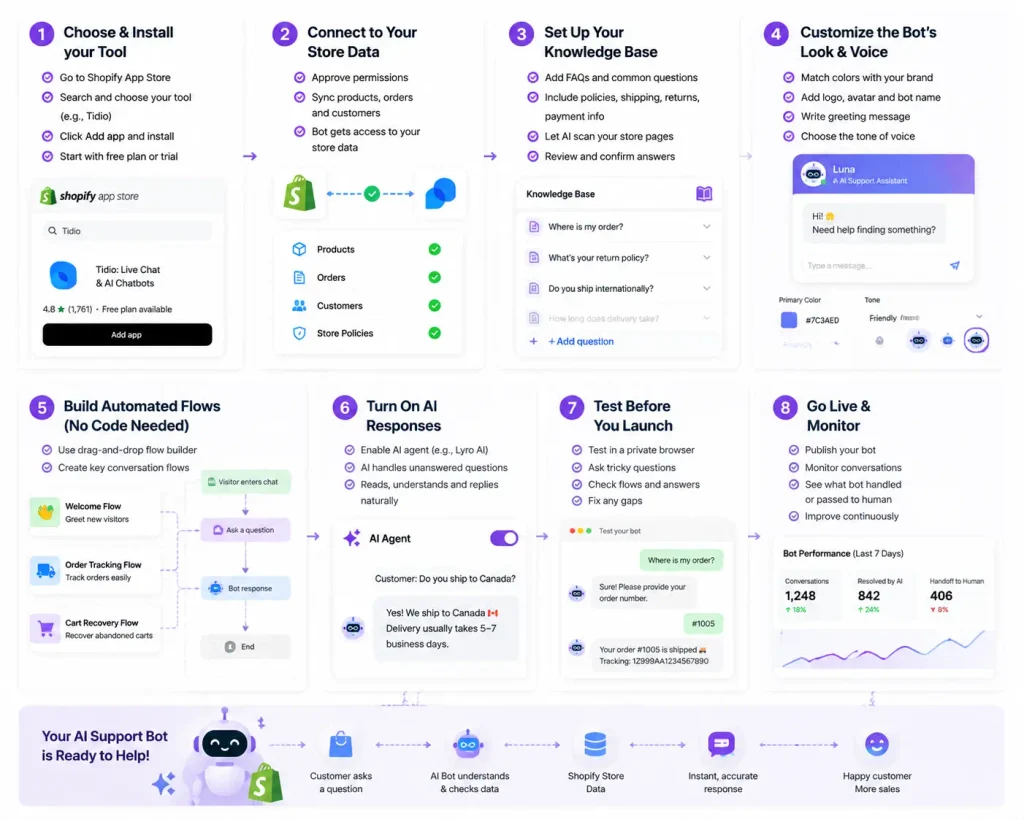
Now for the main event. Follow these steps to launch your bot today. We’ll use Tidio as the example since it’s beginner-friendly, but the process is similar across most tools.
Step 1: Choose and Install Your Tool
Go to the Shopify App Store and search for your chosen tool—say, Tidio. Click Add app, then follow the prompts to install it. The app links to your store automatically, so it can access product and order data.
Tip: Start with a free plan or free trial. You can upgrade once you see results.
Step 2: Connect the Bot to Your Store Data
After installing, the tool asks permission to sync your Shopify catalog, orders, and customer info. Approve this. Now your bot knows your products, prices, shipping options, and order history. This is what makes its answers accurate.
Step 3: Set Up Your Knowledge Base
Feed the bot your most common questions. Think about what customers ask most:
- “Where is my order?”
- “What’s your return policy?”
- “Do you ship internationally?”
- “How long does delivery take?”
Type these questions and their answers into the tool’s knowledge base. Many platforms, like Tidio’s Lyro or Gorgias’s AI, can also scan your store pages and pull answers automatically. Review these to make sure they’re right.
Step 4: Customize the Bot’s Look and Voice
Match the bot to your brand. Set the chat widget color, add your logo, and write a friendly greeting like, “Hi! Need help finding something?” Choose a tone that fits your store—casual, professional, or playful.
You can also set the bot’s name and avatar so it feels more personal.
Step 5: Build Automated Flows (No Code Needed)
Use the drag-and-drop builder to create simple conversation flows. For example:
- A welcome flow that greets new visitors
- An order tracking flow that asks for an order number and returns the status
- A cart recovery flow that offers help when someone lingers on checkout
These builders use visual blocks. You connect them like puzzle pieces—no coding at all.
Step 6: Turn On AI Responses
Enable the AI feature (like Lyro in Tidio or the AI agent in Gorgias). This lets the bot handle questions that don’t match your set flows. The AI reads the customer’s message, checks your data, and writes a natural reply on its own.
Step 7: Test Before You Launch
Open your store in a private browser window and chat with your bot. Ask tricky questions. Check that order tracking works and that answers sound right. Fix any gaps in your knowledge base.
Step 8: Go Live and Monitor
Publish the bot. Watch its conversations for the first week. Most tools show you which questions the bot handled and which it passed to a human. Use this data to improve answers over time.
How to Train Your Bot for Better Answers
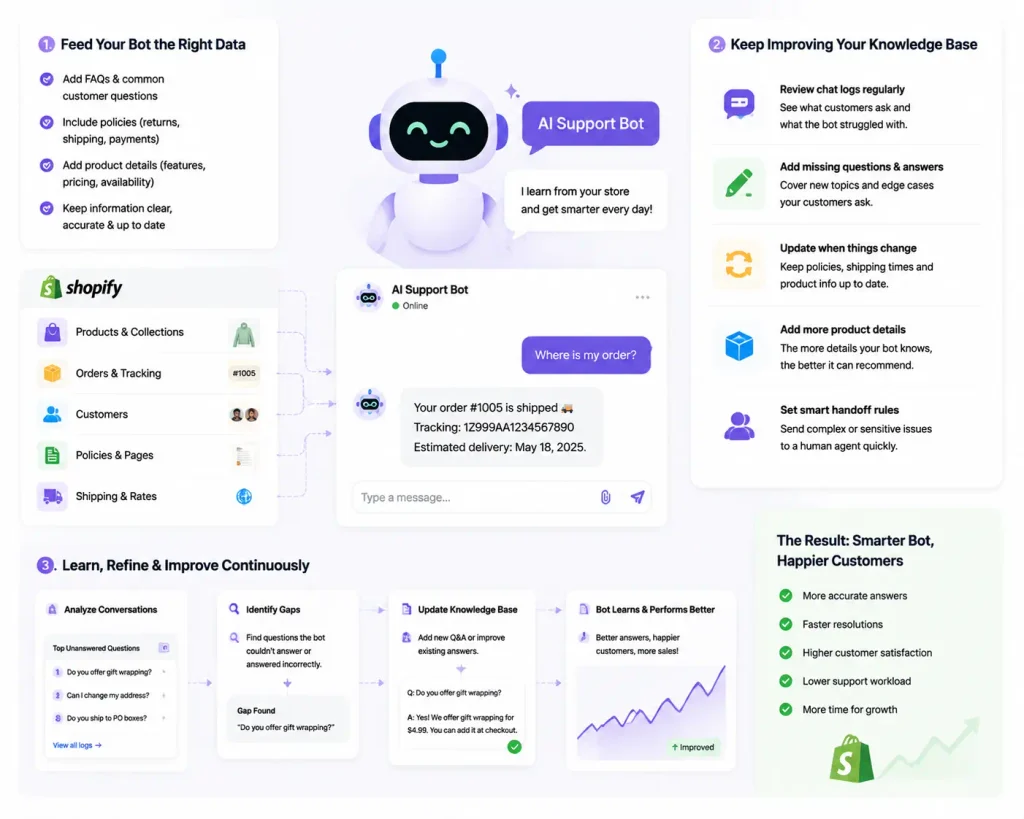
A bot is only as smart as the info you give it. Keep improving it with these habits:
- Review chat logs weekly. Spot questions the bot missed, then add answers.
- Update your knowledge base whenever policies or products change.
- Add product details so the bot can recommend items accurately.
- Set clear handoff rules so complex issues go to a human quickly.
The more you refine it, the more tickets your bot resolves on its own.
How to Integrate the Bot Across Channels
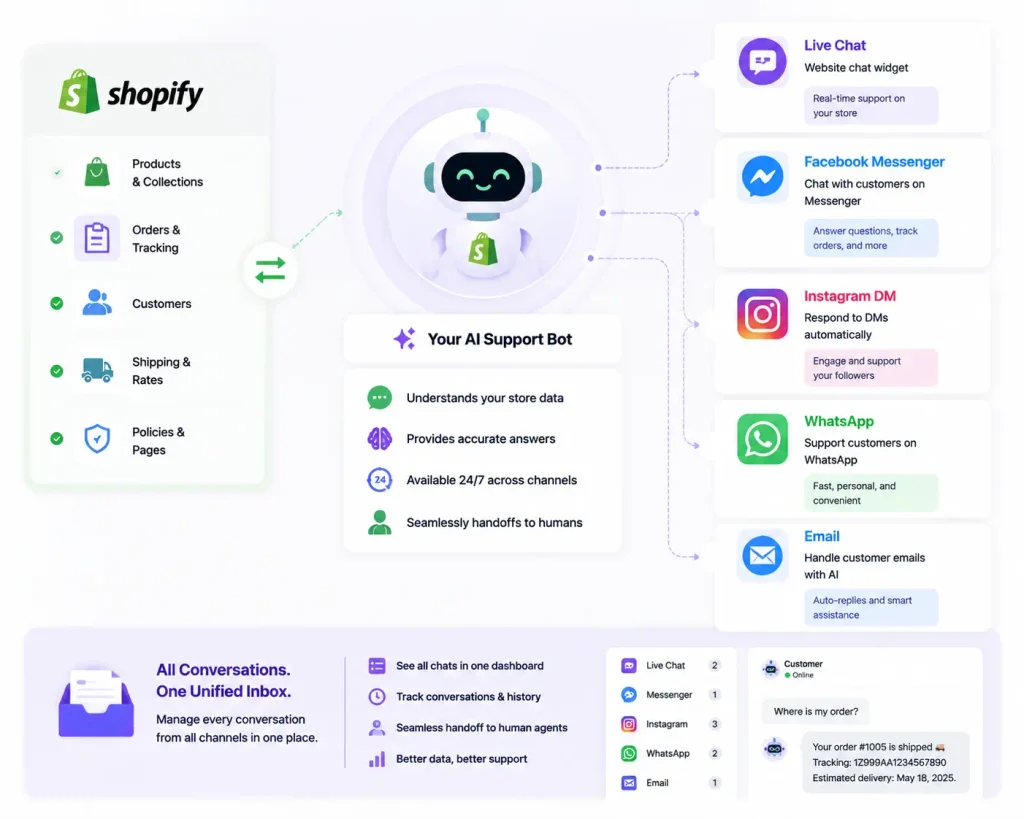
Your customers don’t only use live chat. Connect your bot to other channels for full coverage:
- Email: Tools like Freshdesk and Gorgias route emails through the same bot.
- Facebook Messenger and Instagram: Tidio and others link these in a few clicks.
- WhatsApp: Many platforms now support WhatsApp Business.
One dashboard, every channel. That’s the goal.
Common Mistakes to Avoid
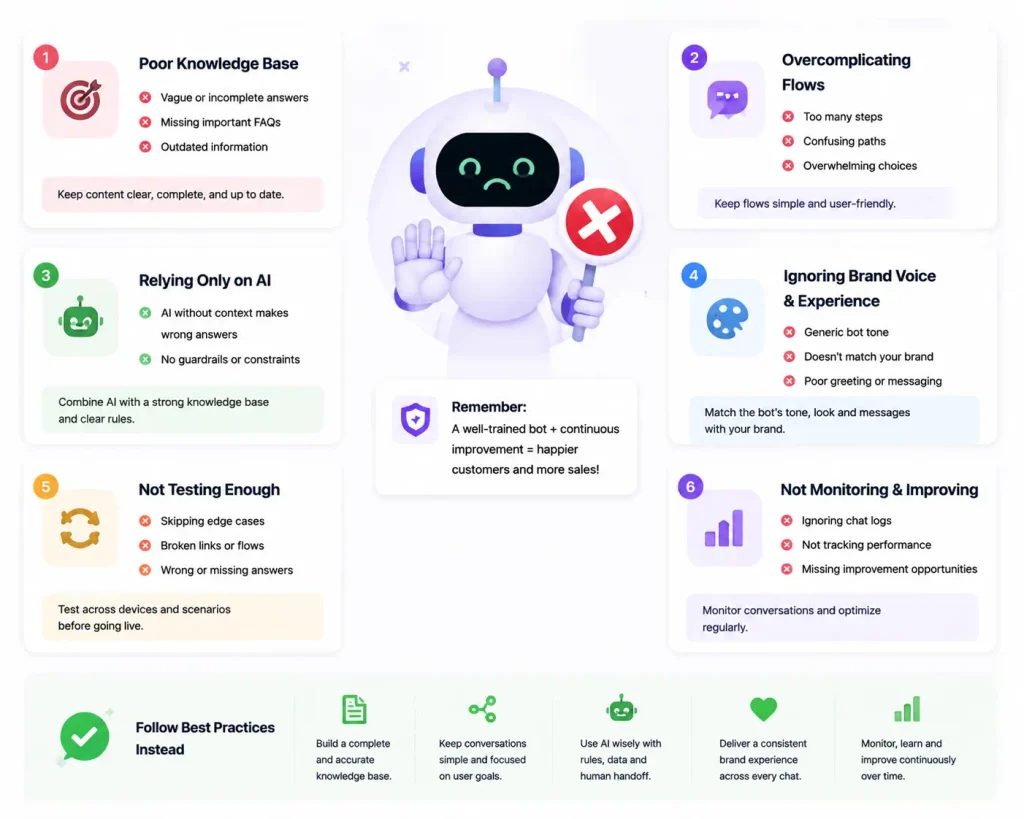
Keep your bot helpful by dodging these errors:
- No human backup. Always let customers reach a person for hard cases.
- Robotic tone. Write warm, clear replies, not stiff scripts.
- Ignoring the data. Check reports and fix weak spots regularly.
- Overloading the widget. Keep the chat clean and simple.
How Much Does a No-Code Shopify Bot Cost?
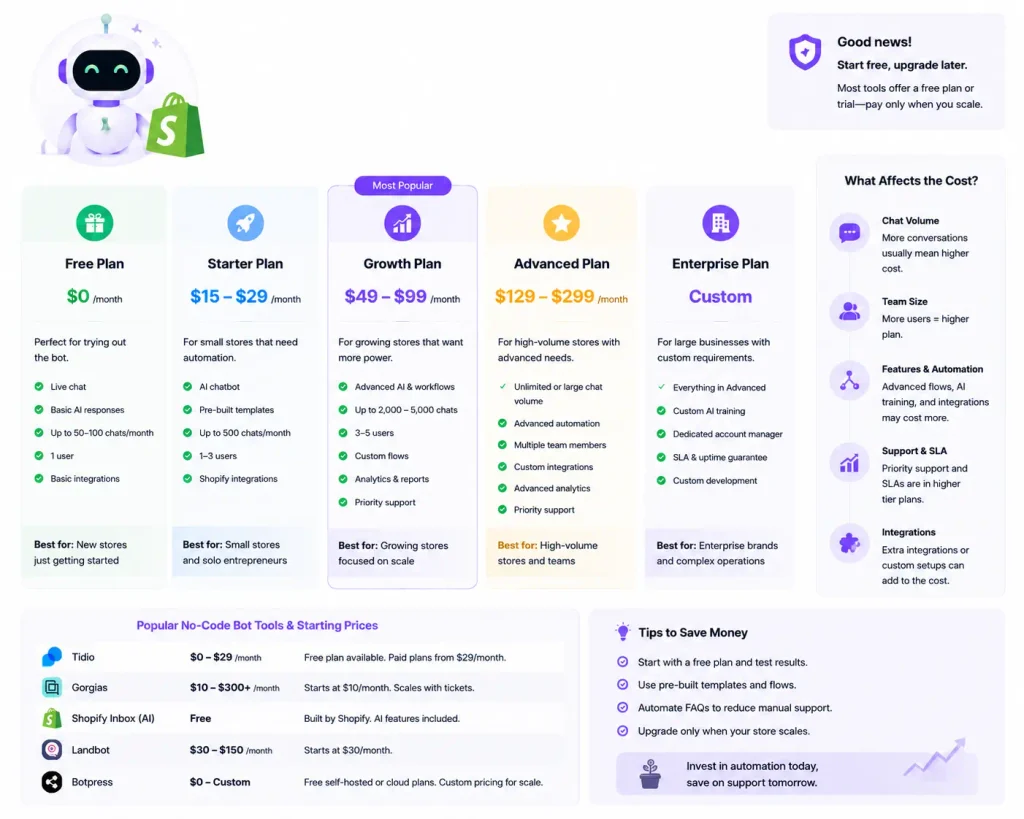
Prices vary by tool and features:
- Free plans: Tidio and Freshdesk offer free tiers for basic use.
- Starter plans: Usually $20–$50 per month for small stores.
- Growth plans: $100–$300+ per month for AI features and higher chat volume.
Start small. Upgrade only when your store grows and needs more power.
Final Thoughts
Building an AI customer support bot for Shopify without coding is easier than ever. Pick a no-code tool that fits your budget, connect it to your store, load up your knowledge base, and turn on AI replies. Within an hour, you’ll have a helper that answers questions, tracks orders, and boosts sales around the clock.
Ready to give your customers faster help and free up your time? Head to the Shopify App Store, install a tool like Tidio or Gorgias today, and launch your first AI support bot before the day ends. Your customers—and your bottom line—will thank you.